Start Here
Benchpark is an open-source infrastructure-as-code Python project which aims to enable reproducibility in HPC benchmarking. It accomplishes this by defining each component of HPC benchmarking, and constraining it separately. Benchpark builds on the specification provided by Spack, an HPC package manager, and Ramble, an HPC testing framework.
See also
Latest Benchpark Tutorial Slides | Benchpark Code on GitHub | Benchpark Dashboard | Ramble | Spack
Benchpark Glossary
The Beginner Tutorial uses the following terms from Spack, Ramble, and Benchpark:
Name |
Source |
Definition |
|---|---|---|
Benchmark |
General |
The source code of a program that tests the performance of hardware and software. |
Package |
A Python module named |
|
Spec |
A description of a particular build configuration of a package. A spec can constrain properties including the package version, compiler, variants, architecture, and dependencies. |
|
Variant |
A named, configurable option that controls how a package is built. A variant can be Boolean, single-valued, or multi-valued. |
|
Application |
A Python module named |
|
Modifier |
An object that encapsulates reusable experiment configuration. Benchpark provides modifier implementations, including Caliper and Allocation, that follow Ramble’s modifier syntax. These modifiers can inject commands before, after, or during experiment execution to capture system resources, experiment data, and metadata, or to enable performance analysis tools. See Benchpark Modifiers. |
|
Experiment |
A Python module named |
|
System |
A Python module named |
|
Scaling Study |
A set of related experiments that varies allocated resources and/or problem size. Benchpark supports strong scaling (varying number of processes or threads for a constant size problem), weak scaling (varying number of processes while keeping the per-process problem size constant), and throughput scaling (varying the problem size while keeping the number of processes constant). |
Benchpark provides a system.py to describe a system, and an experiment.py to
describe how to map a benchmark onto this system. Benchpark uses a Spack package.py
to build and a Ramble application.py to run the benchmark.
Spack Spec Syntax
A Spack package spec can include versions, architecture constraints, compiler constraints, and dependencies, in addition to its package name and variants.
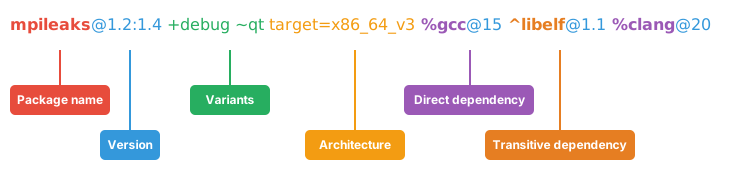
Benchpark System Spec
A Benchpark spec describes a Benchpark object. A system spec selects a definition under
systems/, and an experiment spec selects a definition under experiments/.
The Benchpark system spec defines the hardware resources and software stack, including information that is useful for running benchmarks. This may include the following:
Resources (CPU cores, GPUs)
Scheduler (Slurm, flux)
Process mapping (cores, sockets, GPUs, NICs)
On-node parallelism (CUDA, ROCM, OpenMP)
Software stack
Compilers (which is best?)
MPI implementations (best?)
Math libraries
The Benchpark experiment spec defines any information for reproducible sets of experiments that we can map onto specific systems, such as:
On-node parallelism (CUDA, ROCM, OpenMP)
Problem sizes
Overall problem size, or
Per node or per GPU
Scaling studies
How to scale
How to decompose
Resources (cores, GPUs)
Benchpark’s parser is derived from Spack’s spec parser and implements the object name
and variant portions of its syntax. Every token after
the system or experiment name is a Benchpark variant. Tokens beginning with + are
Boolean variants, while tokens containing = are named variants. compiler=cce and
version=2.3-caliper are named variants defined by their Benchpark objects. They are
not Spack compiler (%) or version (@) constraints.

Benchpark Experiment Spec

Goal |
Benchpark |
Spack |
|---|---|---|
Select a version |
Use a definition’s variant: |
Use a version constraint: |
Select multiple values exactly |
Use |
Use |
Select a compiler |
Not supported. |
Use |
Select a dependency |
Not supported. |
Use |
Select an installed spec by hash |
Not supported. |
Use |