Generate Experiment Status Table
This page demonstrates how to reproduce a portion of Benchpark’s CI to generate the experiment status table. In this example, we run the same amg2023 experiment setup two times on the same system with different versions of ROCm. Then, we collect the metadata output by each generated workspace. Finally, we compare the metadata to identify what changed between the two runs.
In the GitLab CI pipeline, the same collected metadata is combined with job status to produce an experiment status table. The table at the end of this page shows the kind of summary produced by that pipeline.
Prepare the Environment
Log in to Tioga.
Clone Benchpark and enter the repository:
git clone https://github.com/LLNL/benchpark.git
cd benchpark
Create and activate a Python virtual environment:
python3 -m venv env
. env/bin/activate
pip install -r requirements.txt
Collect Metadata
First collect metadata for amg2023 on Tioga with ROCm 6.4.2:
./bin/benchpark system init --dest=tioga_rocm_6.4.2 llnl-elcapitan cluster=tioga rocm=6.4.2
./bin/benchpark experiment init --dest=amg2023 tioga_rocm_6.4.2 amg2023 +rocm caliper=time,mpi
./bin/benchpark setup tioga_rocm_6.4.2/amg2023 wkp/
. wkp/setup.sh
cd ./wkp/tioga_rocm_6.4.2/amg2023/workspace/
ramble --workspace-dir . workspace setup
ramble --workspace-dir . on
Return to the Benchpark repository root, then repeat the workflow with ROCm 7.2.0 (still on Tioga).
cd ~/benchpark
./bin/benchpark system init --dest=tioga_rocm_7.2.0 llnl-elcapitan cluster=tioga rocm=7.2.0
./bin/benchpark experiment init --dest=amg2023 tioga_rocm_7.2.0 amg2023 +rocm caliper=time,mpi
./bin/benchpark setup tioga_rocm_7.2.0/amg2023 wkp/
. wkp/setup.sh
cd ./wkp/tioga_rocm_7.2.0/amg2023/workspace/
ramble --workspace-dir . workspace setup
ramble --workspace-dir . on
Inspect Metadata
After both runs complete, return to the Benchpark repository root:
cd ~/benchpark
Each workspace outputs a githash_metadata.json file for the concrete experiment
instance that was generated and run. Compare the two locally generated metadata files
using the compare-githash-metadata.sh script:
. .gitlab/utils/githash-metadata/compare-githash-metadata.sh \
    wkp/tioga_rocm_6.4.2/amg2023/workspace/experiments/amg2023/problem1/amg2023_problem1_test_mpi_rocm_no_scaling_caliper_time_mpi_80_80_40_2_2_1_4/githash_metadata.json \
    wkp/tioga_rocm_7.2.0/amg2023/workspace/experiments/amg2023/problem1/amg2023_problem1_test_mpi_rocm_no_scaling_caliper_time_mpi_80_80_40_2_2_1_4/githash_metadata.json
The script compares the software stacks of the two runs, so you can more easily identify what software packages have changed between the runs. In this example, the benchmark and experiment (amg2023 on Tioga) are the same, but the ROCm version differs. The changed packages impacted by the difference in the ROCm version are reported in the metadata. Some software packages indicate code changes by releasing (or tagging) new versions, while others use git commits, so we report both in the script. The output of the script is shown below.
======[PACKAGE GITHASH SUMMARY]======
[amg2023]: has no version changes.
[amg2023]: has no commit changes.
[adiak]: has no version changes.
[adiak]: has no commit changes.
[caliper]: has no version changes.
[caliper]: has no commit changes.
[cce]: changed versions from 20.0.0-rocm6.4.2 to 21.0.1-rocm7.2.0.
[cce]: has no commit changes.
[cmake]: has no version changes.
[cmake]: has no commit changes.
[compiler-wrapper]: has no version changes.
[compiler-wrapper]: has no commit changes.
[cray-mpich-gtl]: has no version changes.
[cray-mpich-gtl]: has no commit changes.
[glibc]: has no version changes.
[glibc]: has no commit changes.
[gmake]: has no version changes.
[gmake]: has no commit changes.
[hip]: changed versions from 6.4.2 to 7.2.0.
[hip]: has no commit changes.
[hsa-rocr-dev]: changed versions from 6.4.2 to 7.2.0.
[hsa-rocr-dev]: has no commit changes.
[hypre]: has no version changes.
[hypre]: has no commit changes.
[intel-oneapi-mkl]: has no version changes.
[intel-oneapi-mkl]: has no commit changes.
[llvm-amdgpu]: changed versions from 6.4.2 to 7.2.0.
[llvm-amdgpu]: has no commit changes.
[umpire]: has no version changes.
[umpire]: has no commit changes.
=====================================
CI Status Table
In a full GitLab CI run, we combine the same metadata comparison with pipeline job status. The resulting table is generated as a file at the end of the CI pipeline. It lets developers see both the final state of each experiment and a possible reason for a result differing from a previous related run. The table is meant to be a diagnostic tool to narrow the investigation of new failures or performance regressions, so a developer can know where to explore further. The table alone does not prove causality.
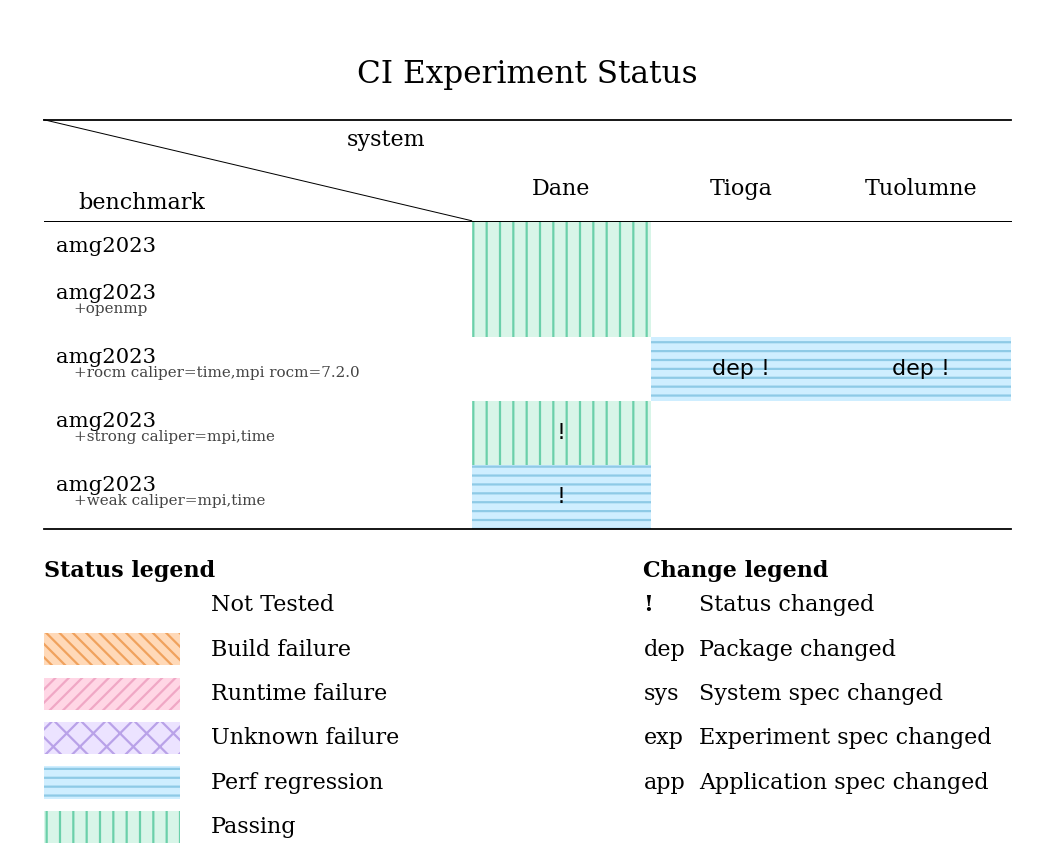
Example experiment status table generated at the end of a GitLab CI pipeline. The
filled cells show experiment status (e.g., build failure, runtime failure), while
labels such as dep or ! identify the type of metadata change. In this
example, benchmark amg2023 +rocm on the Tioga and Tuolumne systems show a
performance regression associated with a package change. This performance regression
is different from the last time this benchmark ran on these systems, so it is marked
with a !. When investigating this regression, a developer can more easily
associate the ROCm change with the performance regression.