Build and Run an Experiment
Glossary terms: Benchmark, Experiment, System
In this example, we show how to repeat an experiment, that is to run the same application experiment on the same system using the same hardware and software stack. As the task often involves the environment of a specific user, it may be challenging for multiple users to repeat each other’s experiments. All components are kept exactly the same when repeating an experiment: system hardware, system software, and application. The only thing that is different in this case is that a new user is running it, or the same user is rerunning at a different time. Performance of the application is expected to be the same (or within an expected deviation in the case of an application with variable runtime).
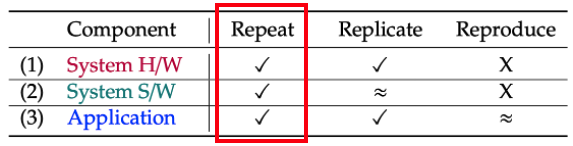
Initialize the AWS tutorial system:
benchpark]$ benchpark system init --dest=hpc-tutorial fluxtainer-aws

Then, initialize the HPL experiment:
benchpark]$ benchpark experiment init hpc-tutorial hpl +strong Ns=-1 caliper=time,mpi

Create the experiment workspace:
benchpark]$ benchpark setup hpc-tutorial/hpl wkp
The setup.sh script generated by benchpark setup activates Benchpark’s Spack and
Ramble environments.
benchpark]$ . wkp/setup.sh
The wkp directory contains ramble, spack, spack-packages, and
hpc-tutorial/hpl/workspace sub-directories. The ramble and spack directories
contain the source for those respective tools. The spack-packages directory contains
a Spack packages repository. The hpc-tutorial/hpl/workspace directory contains the
Ramble workspace for the experiments in this tutorial.
At this point, move into the workspace directory to continue with the remaining steps:
benchpark]$ cd wkp/hpc-tutorial/hpl/workspace
Within this workspace, we can see what experiments we have configured:
workspace]$ ramble --workspace-dir . workspace info
This should print the following output:
Workspace: workspace

Location: /home/fluxuser/benchpark/wkp/hpc-tutorial/hpl/workspace

Experiments:
  Application: hpl
    Workload: standard
      Experiment 1: hpl.standard.hpl_standard_test_mpi_caliper_time_mpi_strong_scaling_1_1000_1
      Experiment 2: hpl.standard.hpl_standard_test_mpi_caliper_time_mpi_strong_scaling_2_1000_2
      Experiment 3: hpl.standard.hpl_standard_test_mpi_caliper_time_mpi_strong_scaling_4_1000_4
      Experiment 4: hpl.standard.hpl_standard_test_mpi_caliper_time_mpi_strong_scaling_8_1000_8
We can see from this that this workspace will execute 4 experiments currently.
Before setting up the Ramble workspace, we will explore a few error cases.
To begin, we will explore what happens when you analyze the workspace before any data has been created.
workspace]$ ramble --workspace-dir . workspace analyze
This command should print an error like the following:
==> Error: No analyzeable experiment detected. Make sure your workspace is setup with
    ramble workspace setup
Additionally, we can attempt to run benchpark analyze using the following:
workspace] benchpark analyze --workspace-dir .
This will print the following error:
INFO:benchpark.cmd.analyze: Found 0 .cali files for analysis.
Traceback (most recent call last):
  File "/home/fluxuser/benchpark/bin/benchpark", line 35, in <module>
    exit_code = main()
                ^^^^^^
  File "/home/fluxuser/benchpark/lib/main.py", line 169, in main
    exit_code = action(args)
                ^^^^^^^^^^^^
  File "/home/fluxuser/benchpark/lib/benchpark/cmd/analyze.py", line 842, in command
    prepare_data(**vars(args))
  File "/home/fluxuser/benchpark/lib/benchpark/cmd/analyze.py", line 382, in prepare_data
    tk = th.Thicket.from_caliperreader(
         ^^^^^^^^^^^^^^^^^^^^^^^^^^^^^^
  File "/home/fluxuser/.local/lib/python3.12/site-packages/thicket/thicket.py", line 459, in from_caliperreader
    return Thicket.reader_dispatch(
           ^^^^^^^^^^^^^^^^^^^^^^^^
  File "/home/fluxuser/.local/lib/python3.12/site-packages/thicket/thicket.py", line 573, in reader_dispatch
    raise ValueError("Iterable must contain at least one file")
ValueError: Iterable must contain at least one file
Next we will manufacture a few errors related to the Spack build, to help show where these errors show up. Update the spec used to install HPL as follows:
workspace]$ ramble --workspace-dir . workspace manage software -o --pkg hpl --spec hpl-err@2.3-caliper~openmp~foo+caliper --prefix spack
Set up the Ramble workspace to build HPL and generate each experiment instance:
workspace]$ ramble --workspace-dir . workspace setup
This will fail with an error similar to the following:
==> Error: Software spec hpl is not defined in environment hpl, but is required by the spack application definition
This error comes from Ramble, in an attempt to make sure the package you need to perform
the experiment is added into the environment that is going to be built using Spack. In
this case, we changed the package name from hpl to hpl-err which triggers the
error. Now, change the package name back:
workspace]$ ramble --workspace-dir . workspace manage software -o --pkg hpl --spec hpl@2.3-caliper~openmp~foo+caliper --prefix spack
Set up the Ramble workspace to build HPL and generate each experiment instance:
workspace]$ ramble --workspace-dir . workspace setup
This will fail with an error similar to the following:
==> Error: Command exited with status 1:
    '/home/fluxuser/benchpark/tutorial-workspaces/wkp/spack/bin/spack' 'concretize' '-U' '-f'
==> Error: Error running spack command: /home/fluxuser/benchpark/tutorial-workspaces/wkp/spack/bin/spack concretize -U -f
==> Error: For more details, see the log file: /home/fluxuser/benchpark/tutorial-workspaces/wkp/hpc-tutorial/hpl/workspace/logs/setup.<date_stamp>/hpl.standard.hpl_standard_test_mpi_caliper_time_mpi_strong_scaling_1_-1_1.out
The last line of this error message points to a log file that contains additional
information. Ramble stores high level logs within this logs/ subdirectory of the
workspace. Opening this file, we see an error close to the bottom that says:
==> Error: No such variant {'foo'} for spec: 'hpl@2.3-caliper~foo+caliper~openmp'
This error tells us that the foo variant we added in the spec is not actually define
in the HPL Spack package. To fix this, we can change the spec back to what it was
before. This can be done using either the command line:
workspace]$ ramble --workspace-dir . workspace manage software -o --pkg hpl --spec hpl@2.3-caliper~openmp+caliper --prefix spack
Or by editing the Ramble workspace configuration file (you can use your favorite editor):
workspace]$ nano config/ramble.yaml
And removing ~foo from the HPL spec in the packages: configuration section.
(After editing, save and exit using Ctrl+O <enter> followed by Ctrl+X)
Now, set up the experiments again:
workspace]$ ramble --workspace-dir . workspace setup
At this point, Ramble has used Spack to install HPL, and configure the experiment directories for you. We’ll explore the experiment directories later, but to see the output from spack you can open the setup log for the first experiment:
workspace]$ nano logs/setup.latest/hpl.standard.hpl_standard_test_mpi_caliper_time_mpi_strong_scaling_1_-1_1.out
If you explore this file, you should see output related to spack concretize and
spack install. For more information on what these content mean, please refer to
Spack’s documentation. At the bottom of the file, you can see all of the phases Ramble
executed to set up these experiments, along with timing data for each of these.
Now, run the experiments:
workspace]$ ramble --workspace-dir . on
This command submits the batch scripts (e.g., submission scripts) generated in ramble
workspace to the system’s resource manager (which is specified in the files generated
by benchpark system init). For the AWS infrastructure used in this tutorial, the
resource manager is LLNL’s Flux resource manager.
If the above command is successful, you should see something like:
==> Streaming details to log:
==>   /home/fluxuser/benchpark/wkp/hpc-tutorial/hpl/workspace/logs/execute.2026-07-09_18.14.08.out
==>   Executing 4 out of 4 experiments:
==>   Log files for experiments are stored in: /home/fluxuser/benchpark/wkp/hpc-tutorial/hpl/workspace/logs/execute.2026-07-09_18.14.08
==> Running executors...
ƒV54uD5o5
ƒV57fKkEK
ƒV5ANUS6s
ƒV5D498h5
The final lines printed by the ramble on command are the job IDs produced by the
system resource manager. You can use these IDs to track the progress of the jobs in your
experiment. For example, with Flux, you can see job status by running:
flux jobs -a
This command will produce an output like:

Note
If you are running on our AWS infrastructure, it should take roughly 1 minute for all jobs to finish running. Additionally, only one job will run at a time under our infrastructure because each user only has 1 node. If you are running on an HPC system, expect the jobs to complete faster.
After the jobs have drained out of the queue, we can analyze them using:
workspace]$ ramble --workspace-dir . workspace analyze
This creates a file in the root of the workspace named results.latest.txt. Opening
this file, we should see the following:
Experiment hpl.standard.hpl_standard_test_mpi_caliper_time_mpi_strong_scaling_1_-1_1 figures of merit:
  Status = FAILED
And in fact, all of the experiments have failed. To find out why, we can open one of the
experiment log files. Ramble creates independent directories for each experiment within
the experiments subdirectory of the workspace. Navigate into one of them using:
workspace]$ cd experiments/hpl/standard/hpl_standard_test_mpi_caliper_time_mpi_strong_scaling_1_-1_1/
Within this directory, you should see the following files:
execute_experiment - The script that is run for the experiment
HPL.dat - The input for HPL
hpl_standard_test_mpi_caliper_time_mpi_strong_scaling_1_-1_1.out - The redirected output from the experiment's execution
Along with several other files. If we open the
hpl_standard_test_mpi_caliper_time_mpi_strong_scaling_1_-1_1.out file, we should see
the following:
HPL ERROR from process # 0, on line 343 of function HPL_pdinfo:
>>> Value of N less than 0 <<<

HPL ERROR from process # 0, on line 621 of function HPL_pdinfo:
>>> Illegal input in file HPL.dat. Exiting ... <<<

flux-job: task(s) exited with exit code 1
This means our HPL input was invalid, causing the run to prematurely exit. This all
stems from our addition of Ns=-1 on the benchpark experiment init line. If we
hadn’t added this line, benchpark would have set the value to be Ns=1000 by default.
To fix this, we will navigate back into the workspace root:
hpl_standard_test_mpi_caliper_time_mpi_strong_scaling_1_-1_1]$ cd ../../../../
Here, open the workspace config file again:
workspace]$ nano configs/ramble.yaml
In the top portion of the file, you should see a group of variables that are defined.
Some are scalars, some are variable references, some are even lists (i.e. n_ranks).
Ramble uses these when generating the individual experiments within this workspace. Find
the variable definition that looks like:
Ns:
- -1
- -1
- -1
- -1
and change all of the -1 to 1000. Then save and exit the file. There are
multiple lines with -1 to allow each value of n_ranks below to have a different
Ns value. Now, delete the old experiment directories to ensure no stale caliper
files exist:
workspace]$ rm -rf experiments/
Then set up the workspace again:
workspace]$ ramble --workspace-dir . workspace setup
And re-submit the jobs:
At this point, set up the workspace again:
workspace]$ ramble --workspace-dir . on
Once the jobs are all finished, we can re-analyze the workspace:
workspace]$ ramble --workspace-dir . workspace analyze
And we can examine the contents of the results.latest.txt file:
workspace]$ nano results.latest.txt
This file should contain the GFLOPs rating for the HPL experiment that you ran, in addition to information about the software stack, and variants used.
Each experiment directory (i.e., subdirectories of experiments/hpl/standard) will
now contain a Caliper output file (i.e., a .cali file) containing performance data
for the job. For individual experiment instances, rerunning experiments, and combining
workspaces into one allocation, see Run an Experiment.