1. Project Documentation
This appendix chapter will discuss this project’s documentation including its dependencies (see Dependencies), building it (see Building), and contributing (see Contributing) to it.
The documentation is written using the Sphinx Python Documentation Generator [Sphinx]. Sphinx is built atop Python [Python] and uses reStructuredText [RST] as its lightweight markup language. Sphinx can output to multiple formats. This documentation targets HTML, PDF (via LaTeX [LaTeX]), Unix manual pages, and Markdown.
Top-level Sphinx Documentation is in the Sphinx master top-level contents.
A resource for reStructuredText (RST) is in the Sphinx RST top-level document.
This project recommends VS Code, Atom, GNU Emacs, and Vim/Neovim editors for development. All of these are cross-platform and support Microsoft Windows, Apple macOS, and GNU/Linux distributions. The Atom editor also, apparently, has packages that support preview rendering of RST files.
1.1. Contributing
This project welcomes everyone who has a desire to contribute. Please feel free to provide us with feedback. If you wish to modify the documentation, then there are some notes below that may be helpful.
All citations should be provided in an appropriate IEEE format.
Please create a git branch for your modifications and additions to the documentation, and submit it as a pull request to the repo.
The pull request CI will build the documentation and place the resulting webpage in the the artifacts, as shown here:
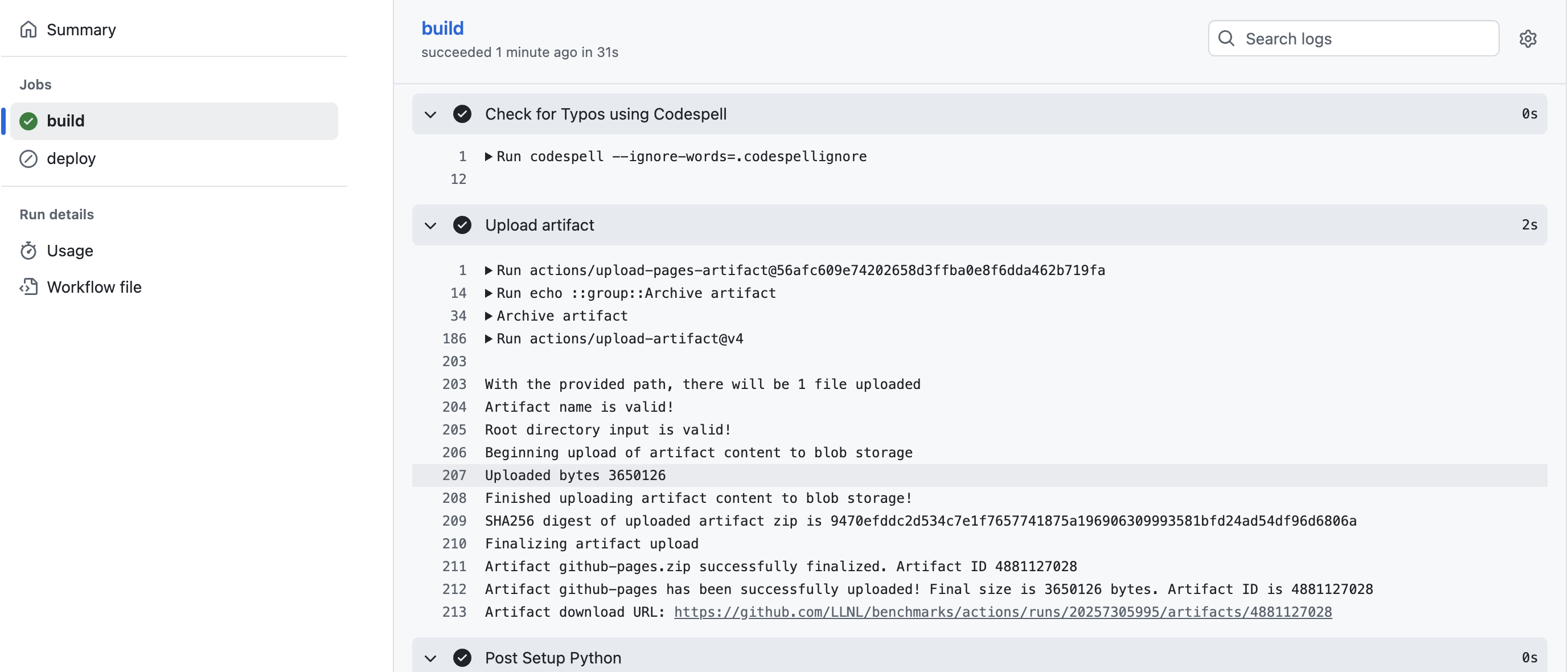
Please download the artifact and verify that the generated webpage is properly formatted.
When ready, please add the
ready for reviewlabel to the pull request so that the repo maintainers can merge your branch intodevelop.
1.2. Dependencies
If you would like to build the documentation locally, installations of Python (e.g., Miniconda [Miniconda]) and LaTeX (e.g., TeX Live [TeXLive]) are needed as Sphinx dependencies. Additionally, the theme being used for HTML rendering (i.e., “sphinx_rtd_theme” [RTDTheme]) is developed by Read the Docs, Inc. [ReadTheDocs]; this, too, is a dependency.
Install a Python distribution. This project recommends Miniconda which will work on Microsoft Windows, Apple macOS, and GNU/Linux distributions. Refer to their site [Miniconda] for more information.
Note
The Miniconda installer will automatically add items to your shell
initialization file (e.g., ~/.bashrc for Bash) to load
Miniconda into the environment. If you do not want Miniconda in
your environment all of the time, then you can add a function to do
this when invoked; an example for Bash is below:
envconda()
{
    tmppath="/path/to/your/miniconda-3/bin"
    eval "$(${tmppath}/conda shell.bash hook)"
    [[ ":$PATH:" != *":${tmppath}:"* ]] && export PATH="${tmppath}:${PATH}"
}
export -f envconda
It is recommended to create a Miniconda environment specifically for building this documentation. This can be done with the command(s) below (which creates an environment named
docsand switches into it):conda create --name docs conda activate docs
Install Sphinx within your Python distribution. If you are using Miniconda, then this can be performed with the following command within the aforementioned
docsenvironment:conda install sphinx
Install the “sphinx-rtd-theme” theme with the following command:
pip install --upgrade \
    --trusted-host pypi.org --trusted-host files.pythonhosted.org \
    sphinx-rtd-theme
Note
Miniconda has a version of the “sphinx_rtd_theme” package, however it is not updated at a desired frequency.
Install TeX Live [TeXLive] for your system (e.g., MacTeX [MacTeX] for Apple macOS) with one of the appropriate URLs provided if PDF generation is desired.
Install the “sphinx-markdown-builder” theme with the following command:
pip install --upgrade \
    --trusted-host pypi.org --trusted-host files.pythonhosted.org \
    sphinx-markdown-builder
1.3. Building
Building the documentation is mostly managed through the
build_doc.py Python script. Its help page can be viewed with the
command build_doc.py -h. Running the command sans command line
parameters will generate the HTML and PDF builds of the
documentation. This script puts the build files and final outputs
within the _build directory.
Note
If the _build directory is already present and you are about to
do a new build, you may want to delete it beforehand.
The command to automatically remove _build if it already exists,
build the HTML and PDF documentation, and to pipe the output to a log
file is below.
rm -rf _build ; ./build_doc.py --html --pdf 2>&1 | tee output.log
If successful, the following top-level files are made. They can be opened with common tools, e.g., Mozilla Firefox for the HTML and Adobe Acrobat for the PDF.
HTML:
_build/html/index.htmlPDF:
_build/latex/fcrbenchmarks.pdf
If things are not successful, then peruse the output from the build
(e.g., captured within output.log from above). If you are
debugging something, then it may be desired to only build the HTML and
not the other targets (e.g., PDF) since the HTML builds far faster;
consult the build_doc.py help page for information on how to
achieve this and increasing its logging activity.
1.4. Plot Generation and Table Inclusion
This section contains an example table being automatically included and plotted from both Gnuplot [Gnuplot] and Matplotlib [Matplotlib]. An easy workflow is to create data in a CSV [CSV] format so it can be directly manipulated to create tables and figures.
1.4.1. Creating a Table from CSV
Tables can easily be generated within Sphinx from CSV via the
csv-table capability; an example Sphinx code block and the result
it produces are provided below.
.. csv-table:: APP Scaling on HAL 9000 Utilizing All Memory Circuits
   :file: example.csv
   :align: center
   :widths: 10, 10, 10
   :header-rows: 1
Memory (%) |
Memory (GiB) |
Discovery |
|---|---|---|
10.0% |
20.0 |
40 |
30.0% |
30.0 |
50 |
50.0% |
40.0 |
60 |
70.0% |
50.0 |
70 |
90.0% |
60.0 |
80 |
1.4.2. Creating a Figure with Gnuplot
A figure of the example data can be generated automatically with
Gnuplot by having a file with the “.gp” extension. The script that
performs this is wrk/gnuplot.sh. The Gnuplot example script that
generates this figure is provided immediately followed by the
resultant figure.
#!/usr/bin/gnuplot
set terminal pngcairo enhanced size 1024, 768 dashed font 'Helvetica,18'
set output "example-gnuplot.png"

set title "Gnuplot: APP Scaling on HAL 9000 Utilizing All Memory Circuits" font "serif,22"
set xlabel "Memory Percentage"
set ylabel "No. of Active Cameras"

set xrange [0:100]
set key left top

# set logscale x 2
# set logscale y 2

set format x "%.0f%%"

set grid
show grid

set datafile separator comma
set key autotitle columnheader

set style line 1 linetype 6 dashtype 1 linecolor rgb "#FF0000" linewidth 2 pointtype 6 pointsize 3
set style line 2 linetype 1 dashtype 2 linecolor rgb "#FF0000" linewidth 2

plot "example.csv" using 1:3 with linespoints linestyle 1
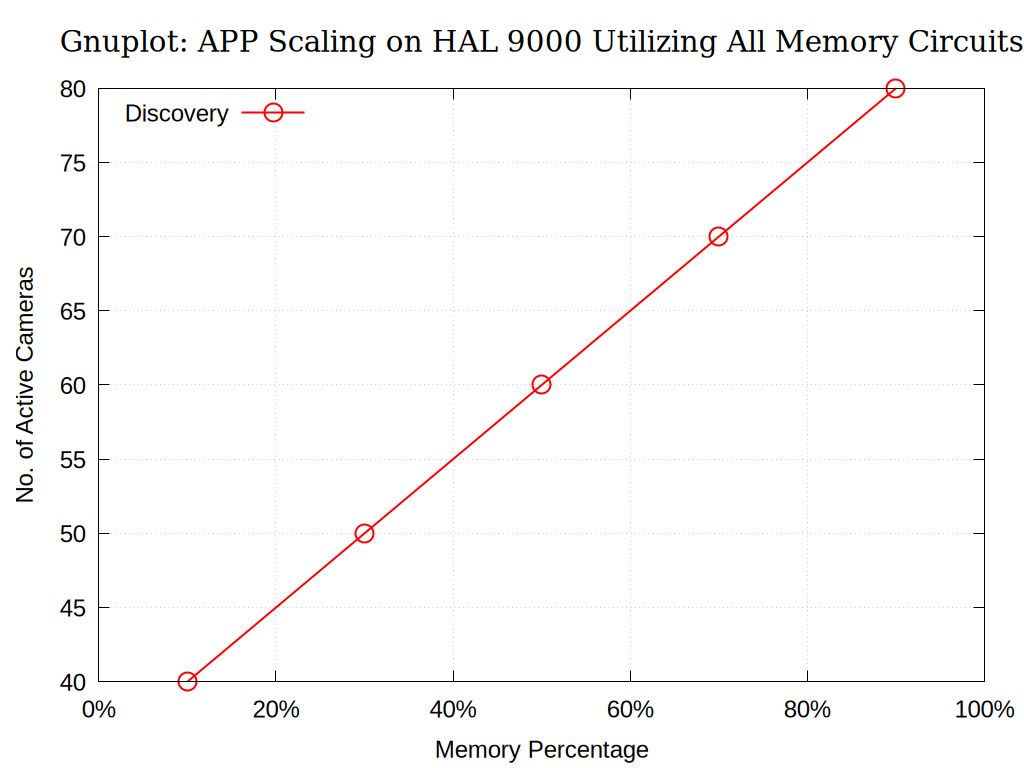
Fig. 1.1 APP Scaling on HAL 9000 Utilizing All Memory Circuits Generated With Gnuplot
1.4.3. Creating a Figure with Matplotlib
A figure of the example data can be generated automatically with
Matplotlib by having a file with the “.matplotlib.py” extension. The
script that performs this is wrk/matplotlib.sh. The Matplotlib
example script that generates this figure is provided immediately
followed by the resultant figure.
#!/usr/bin/env python3

import numpy as np
import matplotlib.pyplot as plt
import matplotlib.ticker as mtick
import pandas as pd


def percent_to_float(percent_str):
    """Convert from percentage to float."""
    return float(percent_str.rstrip("%")) / 100.0


df = pd.read_csv("example.csv")
np_array = df.to_numpy()

x_string = np_array[:, 0]
y = np_array[:, 2]

# Apply the function to the array using np.vectorize
vectorized_func = np.vectorize(percent_to_float)
x = vectorized_func(x_string)

# Create a figure and an axes object
# plt.rcParams["font.family"] = "serif"  # Set default globally
# plt.rcParams["font.size"] = 12 # Set default font size for all text
plt.rcParams["font.family"] = "sans-serif"
plt.rcParams["font.sans-serif"] = ["Helvetica"] + plt.rcParams["font.sans-serif"]
plt.rcParams["font.size"] = 18  # Set default font size for all text
width_pixels = 1024
height_pixels = 768
display_dpi = 100
fig, ax = plt.subplots(
    figsize=(width_pixels / display_dpi, height_pixels / display_dpi), dpi=display_dpi
)

# Plot the data on the axes
ax.plot(
    x,
    y,
    label="Discovery",
    marker="o",
    fillstyle="none",
    linestyle="-",
    color="r",
    markersize=12,
)

# Add labels and a title
ax.set_title(
    "Matplotlib: APP Scaling on HAL 9000 Utilizing All Memory Circuits",
    fontname="serif",
    fontsize=18,
    fontweight="bold",
)
ax.set_xlabel("Memory Percentage")
ax.set_ylabel("No. of Active Cameras")
ax.set_xlim(0, 1)
ax.set_ylim(40, 80)
ax.legend()

# Apply the PercentFormatter
# xmax=1.0 specifies that the value 1.0 should be displayed as 100%.
# decimals=None automatically determines the optimal number of decimal places.
formatter = mtick.PercentFormatter(xmax=1.0, decimals=None)
ax.xaxis.set_major_formatter(formatter)

# Ticks, Major and Minor Gridlines are nice
ax.minorticks_on()
ax.grid(which="major", linestyle=":", linewidth="0.1", color="gray")
# ax.grid(which='minor', linestyle=':', linewidth='0.5', color='gray')

# Display or save the plot
# plt.show()
plt.savefig("example-matplotlib.png")
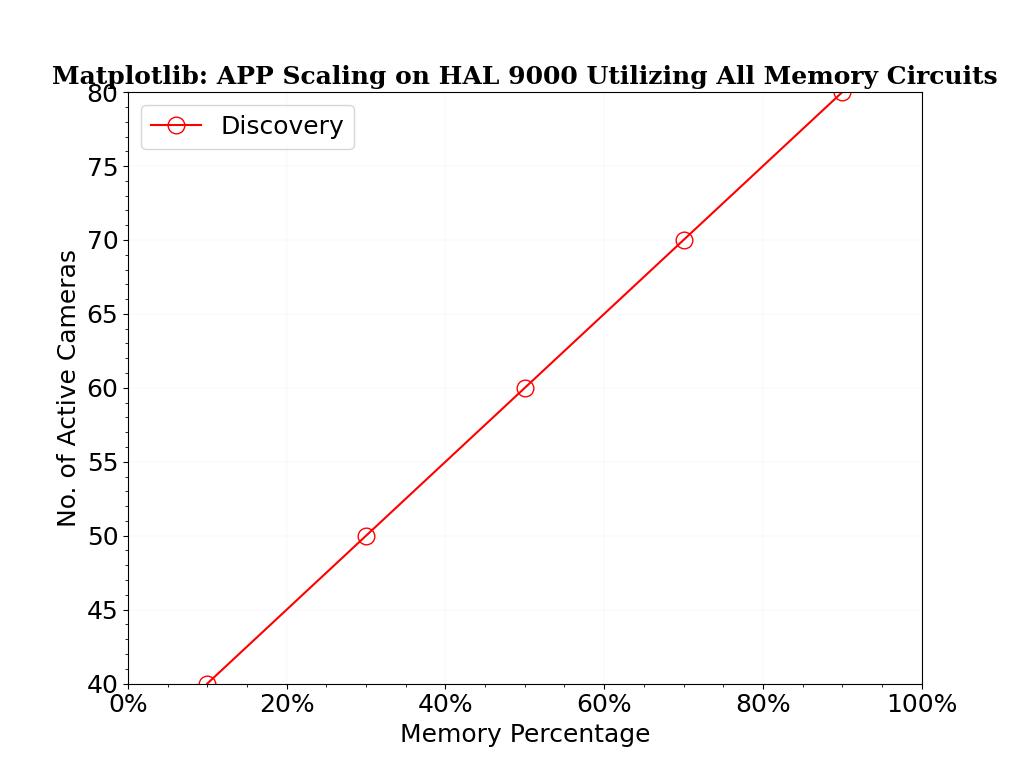
Fig. 1.2 APP Scaling on HAL 9000 Utilizing All Memory Circuits Generated With Matplotlib
1.4.4. Ignore Relevant Files
It is highly recommended to add the files that are autogenerated into
the .gitignore file at the root of the Git repository or the one
within the docs folder.
1.5. Build Script
The aforementioned script that builds this is replicated below for reference.
#!/usr/bin/env python3
# This is a self-contained script that builds documentation for FCR Benchmarks!
# Author: Anthony M. Agelastos <amagela@sandia.gov>


# import Python functions
import sys

assert sys.version_info >= (3, 5), "Please use Python version 3.5 or later."
import argparse
import os
import logging
import shutil
import textwrap
import subprocess
import glob


# define GLOBAL vars
VERSION = "2.71"
TIMEOUT = 30
IS_ALL = False
IS_PDF = False
IS_HTML = False
DIR_BUILD = "_build"
EXIT_CODES = {"success": 0, "no app": 1, "app run issue": 2, "directory issue": 3}


# define global functions
def print_exit_codes():
    """This function prints out exit codes."""
    super_str = "exit codes = {"
    for key, value in EXIT_CODES.items():
        super_str += '"{}": {}, '.format(key, value)
    super_str = super_str[:-2]
    super_str += "}"
    return super_str


def make_dir(logger, mdir):
    """This makes a directory."""
    assert isinstance(logger, logging.RootLogger), "Pass appropriate logging object!"

    bdir = os.path.dirname(mdir)

    # if it already exists...
    if os.path.isdir(mdir):
        logger.info('Directory "{}" is already present.'.format(mdir))
        return

    # if base directory is not writable...
    logger.debug('Directory "{}" is not present.'.format(mdir))
    if not os.access(bdir, os.W_OK):
        logger.critical('Base directory "{}" is not writable!'.format(bdir))
        sys.exit(EXIT_CODES["directory issue"])

    # finally make the friggin thing
    try:
        os.makedirs(mdir)
    except OSError:
        logger.critical('Creation of directory "{}" failed!'.format(mdir))
        sys.exit(EXIT_CODES["directory issue"])
    else:
        logger.info('Creation of directory "{}" was successful'.format(mdir))


def run_app(logger, args):
    """This executes application and args defined in args."""

    # subprocess.run(
    #     [],
    #     stdin=None,
    #     input=None,
    #     stdout=None,
    #     stderr=None,
    #     capture_output=False,
    #     shell=False,
    #     cwd=None,
    #     timeout=TIMEOUT,
    #     check=True,
    #     encoding=None,
    #     errors=None,
    #     text=None,
    #     env=None,
    #     universal_newlines=None,
    # )

    assert isinstance(logger, logging.RootLogger), "Pass appropriate logging object!"

    # generate Makefile and other supported files
    try:
        foo = subprocess.run(args, timeout=TIMEOUT)
        if foo.returncode == 0:
            logger.info("Application {} exited cleanly.".format(args))
        else:
            logger.critical(
                "Application {} exited with non-zero ({}) exit code!".format(
                    args, foo.returncode
                )
            )
            sys.exit(EXIT_CODES["app run issue"])
    except:
        logger.critical("Application {} had issues!".format(args))
        sys.exit(EXIT_CODES["app run issue"])


def check_app(logger, name_app):
    """This checks for a valid installation of an application."""

    assert isinstance(logger, logging.RootLogger), "Pass appropriate logging object!"
    is_app = shutil.which(name_app) is not None
    if is_app:
        logger.info("Found installation of {}.".format(name_app))
    else:
        logger.critical("Did not find installation of {}!".format(name_app))
    return is_app


def do_cmd(command):
    """Execute command."""
    return subprocess.run(
        command,
        stdout=subprocess.PIPE,
        stderr=subprocess.PIPE,
        shell=True,
        universal_newlines=True,
    )


def do_wrk_scripts(logger):
    """This executes found work scripts."""

    dir_wrk = "wrk"
    if not os.path.isdir(dir_wrk):
        logger.info(
            "Did not find {} directory; not executing any scripts.".format(dir_wrk)
        )
        return

    dir_base = os.getcwd()
    os.chdir("wrk")

    # execute BSH/BASH scripts
    files = glob.glob("*.sh")
    files.extend(glob.glob("*.bsh"))
    files.extend(glob.glob("*.bash"))
    for fl in files:
        logger.info("Executing BSH/BASH script {}...".format(fl))
        do_cmd("bash ./" + fl)

    os.chdir(dir_base)


# define classes
class BuildDocHelp(object):
    """This is a class that encapsulates the command line processing for
    building documentation."""

    def __init__(self):
        """Initialize object and create argparse entities."""

        my_epilog = print_exit_codes()
        self.parser = argparse.ArgumentParser(
            description="This Python program will build the documentation for FCR.",
            formatter_class=argparse.ArgumentDefaultsHelpFormatter,
            epilog=my_epilog,
        )

        self.parser.add_argument(
            "-a",
            "--all",
            action="store_true",
            default=IS_ALL,
            help="Generate ALL export types",
        )

        self.parser.add_argument(
            "-p",
            "--pdf",
            action="store_true",
            default=IS_PDF,
            help="Generate PDF export type",
        )

        self.parser.add_argument(
            "--html",
            action="store_true",
            default=IS_HTML,
            help="Generate HTML export type",
        )

        self.parser.add_argument(
            "-l",
            "--logLevel",
            type=str,
            default="info",
            choices=("info", "debug", "warning"),
            help="logging level",
        )

        self.parser.add_argument(
            "-v", "--version", action="version", version="%(prog)s {}".format(VERSION)
        )

        self.args = self.parser.parse_args()

    def get_args(self):
        """This returns argparse-parsed arguments for checking workflow
        state."""
        return self.args


class BuildDoc(object):
    """This class encapsulates the build of ADPS documentation."""

    def __init__(self, **kwargs):
        """Initialize object and define initial desired build state."""

        # set parameters from object instantiation
        for key, value in kwargs.items():
            setattr(self, key, value)

        # check for required attributes
        required_attr = [
            "logger",
            "is_all",
            "is_pdf",
            "is_html",
        ]
        needed_attr = [item for item in required_attr if not hasattr(self, item)]
        assert len(needed_attr) == 0, (
            "Please ensure object {} has the following required "
            "attributes: {}!".format(self.__class____name__, required_attr)
        )

        # check attributes
        self._check_attr()

    def _check_attr(self):
        """This checks object attributes."""

        # check inputs
        assert isinstance(
            self.logger, logging.RootLogger
        ), "Pass appropriate logging object to {}!".format(self.__class__.__name__)
        if not isinstance(self.is_all, bool):
            tmp = bool(self.is_all)
            self.logger.critical(
                "Type issue with is_all within {} (should be bool, is {}); converted to bool and is now {}.".format(
                    self.__class__.__name__, type(self.is_all), tmp
                )
            )
            self.is_all = tmp
        if not isinstance(self.is_pdf, bool):
            tmp = bool(self.is_pdf)
            self.logger.critical(
                "Type issue with is_pdf within {} (should be bool, is {}); converted to bool and is now {}.".format(
                    self.__class__.__name__, type(self.is_pdf), tmp
                )
            )
            self.is_pdf = tmp
        if not isinstance(self.is_html, bool):
            tmp = bool(self.is_html)
            self.logger.critical(
                "Type issue with is_html within {} (should be bool, is {}); converted to bool and is now {}.".format(
                    self.__class__.__name__, type(self.is_html), tmp
                )
            )
            self.is_html = tmp

        # make inputs consistent
        if self.is_pdf:
            self.is_all = False
        if self.is_html:
            self.is_all = False
        elif self.is_all:
            self.is_pdf = True
            self.is_html = True

        # check if applications are installed
        self._check_apps()

        # check if build, etc. directories are ready
        self._check_dirs()

    def _check_apps(self):
        """This checks for valid installations of needed software."""
        is_app = []
        is_app.extend([check_app(self.logger, "sphinx-build")])
        # is_app.extend([check_app(self.logger, "pdflatex")])
        is_app.extend([check_app(self.logger, "make")])
        if sum(is_app) != len(is_app):
            sys.exit(EXIT_CODES["no app"])

    def _check_dirs(self):
        """This checks if needed directories are present."""
        path_absdir_thisscript = os.path.dirname(os.path.abspath(__file__))
        path_absdir_build = os.path.join(path_absdir_thisscript, DIR_BUILD)
        self.logger.debug('Build directory is "{}".'.format(path_absdir_build))
        make_dir(self.logger, path_absdir_build)

    def _build_pdf(self):
        """This builds the documentation with exporting to PDF."""

        if not self.is_pdf:
            return
        self.logger.info("Building PDF...")

        run_app(self.logger, ["sphinx-build", "-b", "latex", ".", "_build"])
        run_app(self.logger, ["make", "latexpdf", "WORKSPACE_PATH=/tmp/workspace"])

    def _build_html(self):
        """This builds the documentation with exporting to HTML."""

        if not self.is_html:
            return
        self.logger.info("Building HTML...")

        run_app(self.logger, ["sphinx-build", "-b", "html", ".", "_build"])
        run_app(self.logger, ["make", "html", "WORKSPACE_PATH=/tmp/workspace"])

    def build_doc(self):
        """This builds the documentation."""
        self.logger.info("Building documentation...")
        self._build_pdf()
        self._build_html()


# do work
if __name__ == "__main__":

    # manage command line arguments
    build_doc_help = BuildDocHelp()
    cl_args = build_doc_help.get_args()

    # manage logging
    int_logging_level = getattr(logging, cl_args.logLevel.upper(), None)
    if not isinstance(int_logging_level, int):
        raise ValueError("Invalid log level: {}!".format(cl_args.logLevel))
    logging.basicConfig(
        format="%(levelname)s - %(asctime)s - %(message)s", level=int_logging_level
    )
    logging.debug("Set logging level to {}.".format(cl_args.logLevel))
    logger = logging.getLogger()

    # manage worker object
    build_doc = BuildDoc(
        logger=logger,
        is_all=cl_args.all,
        is_pdf=cl_args.pdf,
        is_html=cl_args.html,
    )

    # do work
    do_wrk_scripts(logger)
    build_doc.build_doc()

    # exit gracefully
    sys.exit(EXIT_CODES["success"])
Brandl, ‘Overview – Sphinx 4.0.0+ documentation’, 2021. [Online]. Available: https://www.sphinx-doc.org. [Accessed: 12- Jan- 2021]
Python Software Foundation, ‘Welcome to Python.org’, 2021. [Online]. Available: https://www.python.org. [Accessed: 12- Jan- 2021]
Docutils Authors, ‘A ReStructuredText Primer – Docutils 3.0 documentation’, 2015. [Online]. Available: https://docutils.readthedocs.io/en/sphinx-docs/user/rst/quickstart.html. [Accessed: 12- Jan- 2021]
The LaTeX Project, ‘LaTeX - A document preparation system’, 2021. [Online]. Available: https://www.latex-project.org. [Accessed: 12- Jan- 2021]
Anaconda, Inc., ‘Miniconda – Conda documentation’, 2017. [Online]. Available: https://docs.conda.io/en/latest/miniconda.html. [Accessed: 12- Jan- 2021]
TeX Users Group, ‘TeX Live - TeX Users Group’, 2020. [Online]. Available: https://www.tug.org/texlive/. [Accessed: 12- Jan- 2021]
Read the Docs, Inc., ‘GitHub - readthedocs/sphinx_rtd_theme: Sphinx theme for readthedocs.org’, 2021. [Online]. Available: https://github.com/readthedocs/sphinx_rtd_theme. [Accessed: 12- Jan- 2021]
Read the Docs, Inc., ‘Home | Read the Docs’, 2021. [Online]. Available: https://readthedocs.org. [Accessed: 12- Jan- 2021]
MacTeX Developers, ‘MacTeX - TeX Users Group’, TuG Users Group, 2020. [Online]. Available: https://www.tug.org/mactex. [Accessed: 12- Jan- 2021]
Risser and M. Brett, ‘GitHub - clayrisser/sphinx-markdown-builder: sphinx builder that outputs markdown files.’, 2022. [Online]. Available: https://github.com/clayrisser/sphinx-markdown-builder. [Accessed: 8- Feb- 2022]
Williams and C. Kelley, ‘Gnuplot homepage’, 2025. [Online]. Available: https://gnuplot.info. [Accessed: 24- Nov- 2025]
Matplotlib Development Team, ‘Matplotlib - Visualization with Python’, 2025. [Online]. Available: https://matplotlib.org. [Accessed: 24- Nov- 2025]
Wikipedia, “Comma-separated values”, 2025. [Online[. Available: https://en.wikipedia.org/wiki/Comma-separated_values. [Accessed: 24- Nov- 2025]