2.2. Laghos
Laghos source code is near-final at this point. The problems to run are yet to be finalized.
2.2.1. Purpose
Laghos (LAGrangian High-Order Solver) is a miniapp that solves the time-dependent Euler equations of compressible gas dynamics in a moving Lagrangian frame using unstructured high-order finite element spatial discretization and explicit high-order time-stepping. It is available at https://github.com/CEED/Laghos .
2.2.2. Characteristics
2.2.2.1. Problems
The test problems are the Sedov shock (problem 1 in Laghos) in 3D. The test problems should be run with a conforming mesh. Linear, quadratic, and cubic orders are of interest with the following priorities:
2.2.2.1.1. Priority 1 problems
3D Linear This problem uses a kinematic order of 1, and a thermodynamic order of 0 (Q1Q0).
3D Quadratic This problem uses a kinematic order of 2, and a thermodynamic order of 1 (Q2Q1).
2.2.2.1.2. Priority 2 problems
3D Cubic This problem uses a kinematic order of 3, and a thermodynamics order of 2 (Q3Q2).
The problem sizes and partitioning scheme for both problems can be set by the user from the command line. The kinematic order is set using the -ok command-line option while the thermodynamic order is set using -ot. In all cases the default quadrature integration order should be used. See Running for how to run each of the different problems.
2.2.2.2. Figure of Merit
Each time step in Laghos contains 3 major distinct computations:
The inversion of the global kinematic mass matrix (CG H1).
The force operator evaluation from degrees of freedom to quadrature points (Forces).
The physics kernel in quadrature points (UpdateQuadData).
Laghos is instrumented to report the total execution times and rates, in terms of millions of degrees of freedom per second (megadofs), for each of these computational phases. (The time for inversion of the local thermodynamic mass matrices (CG L2) is also reported, but that takes a small part of the overall computation.) Rates are averaged over all RK stages taken and for the purposes of benchmarking are configured to attempt 250 RK4 timesteps.
Laghos also reports the total rate for these major kernels, which is the Figure of Merit (FOM) for benchmarking purposes.
2.2.3. Source code modifications
Please see Run Rules Synopsis for general guidance on allowed modifications.
For Laghos we define the following restrictions on source code modifications:
Laghos must use MFEM and Hypre as the solver library, available at https://github.com/mfem/mfem and https://github.com/hypre-space/hypre respectively. Hypre must be built with
HYPRE_ENABLE_MIXEDINT=ON. The final validated results must match or exceed the results of double precision accuracy shown in Validation.Laghos and MFEM must be built using RAJA, available at https://github.com/llnl/raja . Depending on system configuration RAJA can be built with “CUDA” or “HIP” device backends.
The listed command line options for Laghos shown in Running must be used without modifications. Adding the appropriate options to enable GPU execution or GPU-aware MPI is ok. Users may configure MPI to launch Laghos as desired. Example: on El Capitan in order to use GPU-aware MPI the MPICH_GPU_SUPPORT_ENABLED environment variable must be set.
Hypre/MFEM/Laghos may optionally be built with Umpire (https://github.com/LLNL/Umpire). The host and device memory allocators may be changed to any available allocator in MFEM.
LAGHOS_DEVICE_SYNC in laghos_solver.cpp must not be changed to get an accurate FOM.
Code related to validating the Sedov solution must not be changed. These include sedov_sol.hpp, sedov_sol.cpp, bisect.hpp, adaptive_quad.hpp, and err_order in laghos.cpp. The Sedov solution must be computed using double precision even if Laghos is modified to run with single precision.
2.2.4. Building
Prerequisites:
CMake 3.24.0+
C compiler
C++20 compiler
MPI
These instructions install all dependencies to a user-defined $INSTALLDIR using a user-defined $CC C compiler, $CXX C++-17 compiler, $CUDACC CUDA compiler (for CUDA acceleration), and $HIPCC HIP compiler (for HIP acceleration). Both nvcc and clang are supported as the CUDA compiler.
2.2.4.1. Umpire (required)
CUDA:
git clone https://github.com/LLNL/Umpire.git
cd Umpire
mkdir build
cd build
cmake .. -DCMAKE_BUILD_TYPE=Release -DCMAKE_CUDA_ARCHITECTURES=native -DENABLE_CUDA=ON -DUMPIRE_ENABLE_C=ON -DCMAKE_INSTALL_PREFIX=$INSTALLDIR -DCMAKE_C_COMPILER=$CC -DCMAKE_CXX_COMPILER=$CXX -DCMAKE_CUDA_COMPILER=$CUDACC
make -j install
HIP:
git clone https://github.com/LLNL/Umpire.git
cd Umpire
mkdir build
cd build
cmake .. -DCMAKE_BUILD_TYPE=Release -DCMAKE_HIP_ARCHITECTURES=native -DENABLE_HIP=ON -DUMPIRE_ENABLE_C=ON -DCMAKE_INSTALL_PREFIX=$INSTALLDIR -DCMAKE_C_COMPILER=$CC -DCMAKE_CXX_COMPILER=$CXX -DCMAKE_HIP_COMPILER=$HIPCC
make -j install
2.2.4.2. RAJA (required)
CUDA:
git clone https://github.com/LLNL/RAJA.git
cd RAJA
mkdir build
cd build
cmake .. -DCMAKE_BUILD_TYPE=Release -DCMAKE_INSTALL_PREFIX=$INSTALLDIR -DRAJA_ENABLE_EXAMPLES=Off -DRAJA_ENABLE_TESTS=Off -DCMAKE_C_COMPILER=$CC -DCMAKE_CXX_COMPILER=$CXX -DCMAKE_CUDA_COMPILER=$CUDACC -DENABLE_CUDA=ON -DCMAKE_CUDA_ARCHITECTURES=native
make -j install
HIP:
git clone https://github.com/LLNL/RAJA.git
cd RAJA
mkdir build
cd build
cmake .. -DCMAKE_BUILD_TYPE=Release -DCMAKE_INSTALL_PREFIX=$INSTALLDIR -DRAJA_ENABLE_EXAMPLES=Off -DRAJA_ENABLE_TESTS=Off -DCMAKE_C_COMPILER=$CC -DCMAKE_CXX_COMPILER=$CXX -DCMAKE_HIP_COMPILER=$HIPCC -DENABLE_HIP=ON -DCMAKE_HIP_ARCHITECTURES=native -DROCPRIM_DIR=$ROCM_PATH
make -j install
2.2.4.3. Hypre (required)
CUDA:
git clone https://github.com/hypre-space/hypre.git
cd hypre/build
cmake ../src -DCMAKE_BUILD_TYPE=Release -DHYPRE_ENABLE_MIXEDINT=ON -DCMAKE_INSTALL_PREFIX=$INSTALLDIR -DHYPRE_ENABLE_CUDA=ON -DCMAKE_CUDA_ARCHITECTURES=native -DCMAKE_C_COMPILER=$CC -DCMAKE_CXX_COMPILER=$CXX -DCMAKE_CUDA_COMPILER=$CUDACC -DHYPRE_ENABLE_GPU_AWARE_MPI=ON -DHYPRE_ENABLE_UMPIRE=ON
make -j install
HYPRE_ENABLE_GPU_AWARE_MPI and HYPRE_ENABLE_UMPIRE may be optionally turned off.
HIP:
git clone https://github.com/hypre-space/hypre.git
cd hypre/build
cmake ../src -DCMAKE_BUILD_TYPE=Release -DHYPRE_ENABLE_MIXEDINT=ON -DCMAKE_INSTALL_PREFIX=$INSTALLDIR -DHYPRE_ENABLE_HIP=ON -DCMAKE_HIP_ARCHITECTURES=native -DCMAKE_C_COMPILER=$CC -DCMAKE_CXX_COMPILER=$CXX -DCMAKE_HIP_COMPILER=$HIPCC -DHYPRE_ENABLE_GPU_AWARE_MPI=ON -DHYPRE_ENABLE_UMPIRE=ON
make -j install
HYPRE_ENABLE_GPU_AWARE_MPI and HYPRE_ENABLE_UMPIRE may be optionally turned off.
2.2.4.4. MFEM (required)
CUDA:
git clone https://github.com/mfem/mfem.git
cd mfem
mkdir build
cd build
cmake .. -DCMAKE_BUILD_TYPE=Release -DCMAKE_INSTALL_PREFIX=$INSTALLDIR -DHYPRE_DIR=$INSTALLDIR -DRAJA_DIR=$INSTALL_DIR -DMFEM_USE_MPI=ON -DMFEM_USE_CUDA=ON -DMFEM_USE_UMPIRE=ON -DMFEM_USE_RAJA=ON -DCMAKE_CUDA_ARCHITECTURES=native -DCMAKE_CXX_COMPILER=$CXX -DCMAKE_CUDA_COMPILER=$CUDACC -DUMPIRE_DIR=$INSTALLDIR -DCMAKE_CXX_STANDARD=20
make -j install
MFEM_USE_UMPIRE may be optionally turned off.
HIP:
git clone https://github.com/mfem/mfem.git
cd mfem
mkdir build
cd build
cmake .. -DCMAKE_BUILD_TYPE=Release -DCMAKE_INSTALL_PREFIX=$INSTALLDIR -DHYPRE_DIR=$INSTALLDIR -DRAJA_DIR=$INSTALL_DIR -DMFEM_USE_MPI=ON -DMFEM_USE_HIP=ON -DMFEM_USE_UMPIRE=ON -DMFEM_USE_RAJA=ON -DCMAKE_HIP_ARCHITECTURES=native -DCMAKE_CXX_COMPILER=$CXX -DCMAKE_HIP_COMPILER=$HIPCC -DUMPIRE_DIR=$INSTALLDIR -DCMAKE_CXX_STANDARD=20
make -j install
MFEM_USE_UMPIRE may be optionally turned off.
2.2.4.5. Laghos (required)
CUDA:
git clone https://github.com/CEED/Laghos.git
cd Laghos
mkdir build
cd build
cmake .. -DCMAKE_BUILD_TYPE=Release -DCMAKE_INSTALL_PREFIX=$INSTALLDIR -DCMAKE_CXX_COMPILER=$CXX -DCMAKE_CUDA_COMPILER=$CUDACC -DCMAKE_CUDA_ARCHITECTURES=native -DCMAKE_CXX_STANDARD=20
make -j
HIP:
git clone https://github.com/CEED/Laghos.git
cd Laghos
mkdir build
cd build
cmake .. -DCMAKE_BUILD_TYPE=Release -DCMAKE_INSTALL_PREFIX=$INSTALLDIR -DCMAKE_CXX_COMPILER=$CXX -DCMAKE_HIP_COMPILER=$HIPCC -DCMAKE_HIP_ARCHITECTURES=native -DCMAKE_CXX_STANDARD=20
make -j
2.2.5. Running
Benchmark runs should target approximately 4194304 (4x1024x1024) quadrature points per “compute device” (i.e. one GPU). The -epm parameter will generate a domain which has the specified number of elements/zones per MPI rank and equally distribute them to all ranks. The following table has the number of quadrature points per zone for various orders, and -epm values for each MPI rank being assigned one GPU.
Order |
QPts per zone |
epm |
Q1Q0 |
8 |
524288 |
Q2Q1 |
64 |
65536 |
Q3Q2 |
216 |
19418 |
Run commands using the tabulated values for -epm are given below.
# 3D Q1Q0
laghos -dim 3 -p 1 -ok 1 -ot 0 -oq -1 -pa -no-nc -ms 250 -tf 100000 --mem --fom -epm 524288 -d raja-gpu
# 3D Q2Q1
laghos -dim 3 -p 1 -ok 2 -ot 1 -oq -1 -pa -no-nc -ms 250 -tf 100000 --mem --fom -epm 65536 -d raja-gpu
# 3D Q3Q2
laghos -dim 3 -p 1 -ok 3 -ot 2 -oq -1 -pa -no-nc -ms 250 -tf 100000 --mem --fom -epm 19418 -d raja-gpu
Available Laghos options for configuring the GPU compute and MPI:
-devfor specifying which GPU to run on for a multi-GPU system (if not restricted by the job scheduler first).
-gamfor GPU-aware MPI
-dev-pool-sizefor specifying an initial Umpire device memory pool size.
Any MPI scheduler options are allowed.
2.2.6. Validation
Code correctness is validated by using the following tests and comparing the outputted Energy diff, and Density L2 error. These quantities must be less than or equal to the following values (CPU and GPU cases should give a similar output):
# can be any power of 2 up to 64: [1,2,4,8,16,32,64]
nprocs_per_side=1
nranks=$((nprocs_per_side*nprocs_per_side*nprocs_per_side))
epm=$((262144/nranks))
# MPI run command can be modified as long as $nranks total ranks are used
mpirun -n $nranks laghos -dim 3 -p 1 -ok 1 -ot 0 -oq -1 -pa -no-nc -tf 0.6 -err -epm $epm
mpirun -n $nranks laghos -dim 3 -p 1 -ok 1 -ot 0 -oq -1 -pa -no-nc -tf 0.6 -err -d raja-gpu -epm $epm
Energy  diff: 7.61e-05
Density L2 error: 1.95e-01
# MPI run command can be modified as long as $nranks total ranks are used
mpirun -n $nranks laghos -dim 3 -p 1 -ok 2 -ot 1 -oq -1 -pa -no-nc -tf 0.6 -err -epm $epm
mpirun -n $nranks laghos -dim 3 -p 1 -ok 2 -ot 1 -oq -1 -pa -no-nc -tf 0.6 -err -d raja-gpu -epm $epm
Energy  diff: 3.46e-06
Density L2 error: 1.28e-01
# MPI run command can be modified as long as $nranks total ranks are used
mpirun -n $nranks laghos -dim 3 -p 1 -ok 3 -ot 2 -oq -1 -pa -no-nc -tf 0.6 -err -epm $epm
mpirun -n $nranks laghos -dim 3 -p 1 -ok 3 -ot 2 -oq -1 -pa -no-nc -tf 0.6 -err -d raja-gpu -epm $epm
Energy  diff: 8.82e-06
Density L2 error: 1.03e-01
The Density L2 error for other resolutions is shown in the following plot (for an N*N*N domain).
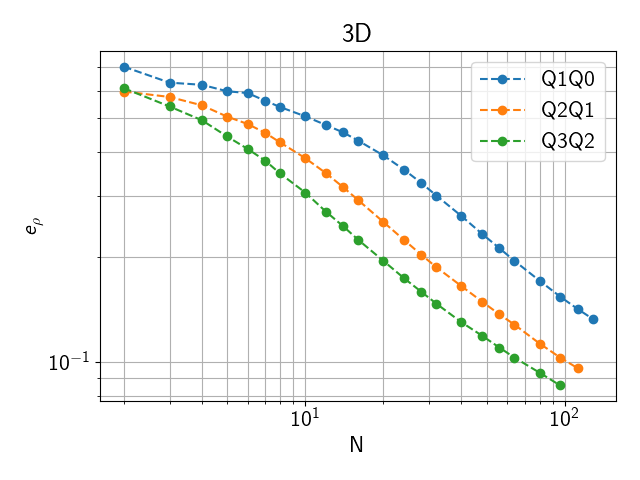
Fig. 2.1 Density L2 error for an NxNxN zone domain
2.2.7. Example Scalability Results
TODO
2.2.8. Memory Usage
Total memory usage scales roughly proportional to the total number of DOFs.
Both CPU and GPU memory usage can be outputted using the --mem option.
This will output the memory usage as (max rank CPU mem)/(total CPU mem) MB, (max rank GPU mem)/(total GPU mem) MB, where max rank CPU mem and max rank GPU mem are the maximum CPU and GPU memory usage of any single MPI rank respectively, while total CPU mem and total GPU mem are the total amount of CPU and GPU memory used by all ranks.
Sample CPU and GPU memory usage on a single El Capitan node are shown below.
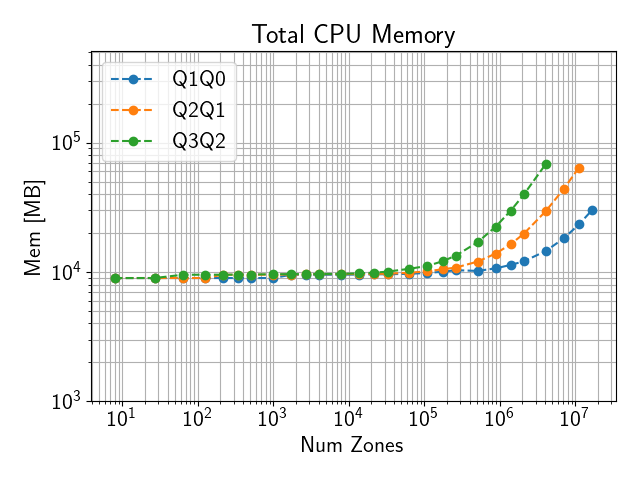
Fig. 2.2 CPU memory use on El Capitan with 4 ranks on a single node
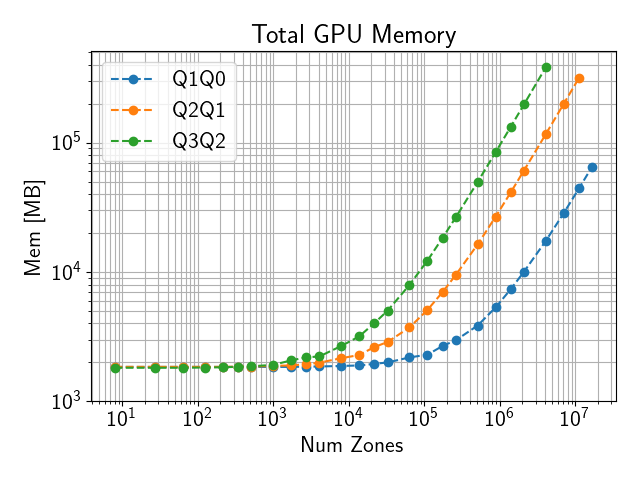
Fig. 2.3 GPU memory use on El Capitan with 4 ranks on a single node
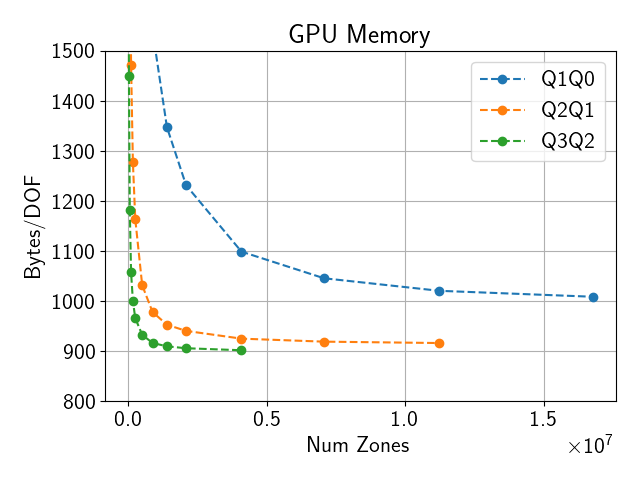
Fig. 2.4 GPU memory use on El Capitan with 4 ranks on a single node per DOF
2.2.9. Strong Scaling on El Capitan
Please see El Capitan for El Capitan system description.
TODO
2.2.10. Weak Scaling on El Capitan
TODO
2.2.11. References
Dobrev, Tz. Kolev and R. Rieben ‘High-order curvilinear finite element methods for Lagrangian hydrodynamics’, SIAM Journal on Scientific Computing, (34) 2012, pp. B606–B641. https://doi.org/10.1137/120864672