Multi-Agent Design Assistant (MADA)
Link your AI agents together with MADA, an Autogen and Python powered application to piece your agentic workflows together in one location.
Why use MADA?
As artificial intelligence continues to evolve, researchers and practitioners increasingly rely on multiple specialized agents to tackle complex scientific and engineering challenges. However, integrating these agents and orchestrating their collaboration can be difficult, often requiring custom solutions and significant technical overhead.
MADA addresses these challenges by providing a unified, user-friendly framework for connecting and managing AI agents. With MADA, users can:
- Simplify agent integration: Eliminate the need for ad hoc code by using a standardized platform for connecting diverse AI agents.
- Accelerate workflow development: Quickly build and adapt multi-agent workflows without reinventing the wheel for each new project.
- Enhance collaboration: Enable seamless communication between agents, including large language models (LLMs), data processors, and domain-specific tools.
- Promote reproducibility: Ensure that workflows are easy to share, modify, and extend across different teams and projects.
By choosing MADA, users gain a robust foundation for building and scaling sophisticated, multi-agent AI systems—empowering them to focus on innovation rather than infrastructure.
Goals and Motivations
MADA was developed to offer a flexible, easily configurable framework for connecting AI agents, enabling the execution of advanced scientific workflows. The MADA team designed this project to empower users from diverse domains to seamlessly integrate large language models (LLMs) with their AI agents.
The primary goals of MADA are:
- Flexibility: Allow users to customize agent interactions and workflows according to their specific research or application needs.
- Ease of Configuration: Provide straightforward tools and interfaces for setting up and managing AI agent collaborations, minimizing the need for extensive technical expertise.
- Domain Agnosticism: Ensure that the framework can be adopted across various scientific and technical fields, supporting a wide range of use cases.
- State-of-the-Art Integration: Enable users to leverage the latest advancements in AI and machine learning by facilitating smooth communication between LLMs and specialized agents.
By focusing on these objectives, MADA aims to accelerate scientific discovery and innovation, making it easier for researchers and practitioners to harness the power of multi-agent systems in their workflows.
Getting Started
Install MADA
View the Basic Installation and Environment Variable Setup sections of the Installation Guide.
Configure MADA
MADA is configured via JSON configuration files. See Configuring MADA for more information.
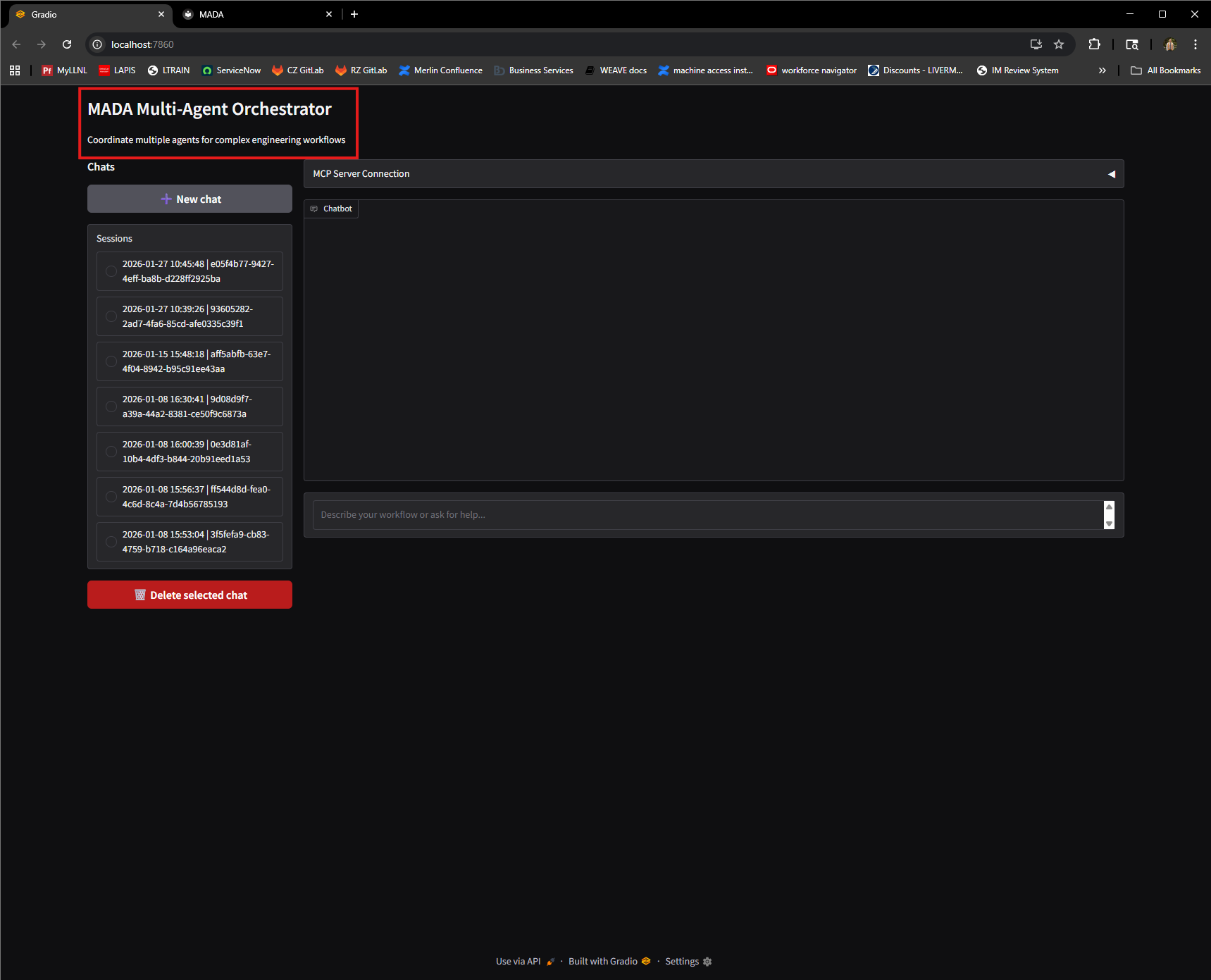
We'll start by configuring the Gradio interface:
{
    "interface": {
        "title": "Multi-Agent Design Automation",
        "description": "Create several simulations and perform inverse design optimization."
    }
}
This is metadata that will be displayed when we start the Gradio app to help clarify what your project is doing.
Next, let's tell MADA which MCP servers we have:
{
    "interface": {
        "title": "Multi-Agent Design Automation",
        "description": "Create several simulations and perform inverse design optimization."
    },
    "mcp_servers": {
        "flux": {
            "transport": "streamable-http",
            "url": "http://localhost:8001/mcp",
            "description": "Flux workload manager for job execution"
        },
        "professor": {
            "transport": "streamable-http",
            "url": "http://localhost:8005/mcp",
            "description": "Professor surrogate modeling"
        },
        "vertex_cfd": {
            "transport": "streamable-http",
            "url": "http://localhost:8007/mcp",
            "description": "Vertex-CFD simulation"
        }
    }
}
Here we provide a URL to the running server for each MCP server we define.
Now let's point MADA to the agents that we want to use:
{
    "interface": {
        "title": "Multi-Agent Design Automation",
        "description": "Create several simulations and perform inverse design optimization."
    },
    "mcp_servers": {
        "flux": {
            "transport": "streamable-http",
            "url": "http://localhost:8001/mcp",
            "description": "Flux workload manager for job execution"
        },
        "professor": {
            "transport": "streamable-http",
            "url": "http://localhost:8005/mcp",
            "description": "Professor surrogate modeling"
        },
        "vertex_cfd": {
            "transport": "streamable-http",
            "url": "http://localhost:8007/mcp",
            "description": "Vertex-CFD simulation"
        }
    },
    "agents": [
        {
            "agent_name": "JobManagementAgent",
            "description": "Generates parameter samples and executes computational workflows",
            "domain": "job_management",
            "mcp_servers": ["flux"],
            "instructions": [
                "You are a Job Management Agent specialized in parameter generation and job execution.",
                "You have access to Flux for executing simulation runs.",
                "You handle the complete workflow from parameter generation through job execution."
            ]
        },
        {
            "agent_name": "SimulationAgent",
            "description": "Create simulation parameter runs and analyze results",
            "domain": "inverse_design",
            "mcp_servers": ["vertex_cfd"],
            "instructions": [
                "You are a Simulation Agent specialized in creating Vertex-CFD parameter runs and analyzing simulation results.",
                "You have access to Vertex-CFD for parameter run creation and result analysis.",
                "Your responsibilities include generating Vertex-CFD parameter runs with the tool 'generate_parameter_runs' and analyzing the results with the tool 'post_process_runs'.",
                "You do NOT execute jobs - that is handled by the JobManagementAgent.",
                "You pass the returned json from 'generate_parameter_runs' to JobManagementAgent so it can start running the simulations."
            ]
        },
        {
            "agent_name": "InverseDesignAgent",
            "description": "Analyzes simulation results and calculates Quality of Interest (QoI)",
            "domain": "inverse_design",
            "mcp_servers": ["professor"],
            "incstructions": [
                "You are an Inverse Design Agent specialized in analyzing simulation results and calculating Quality of Interest (QoI).",
                "You have access to Professor for surrogate modeling.",
                "Your responsibilities include analyzing completed simulation results, calculating QoI metrics, identifying best designs, and building surrogate models for optimization.",
                "You do NOT generate parameters or execute jobs - that is handled by the JobManagementAgent."
            ]
        }
    ]
}
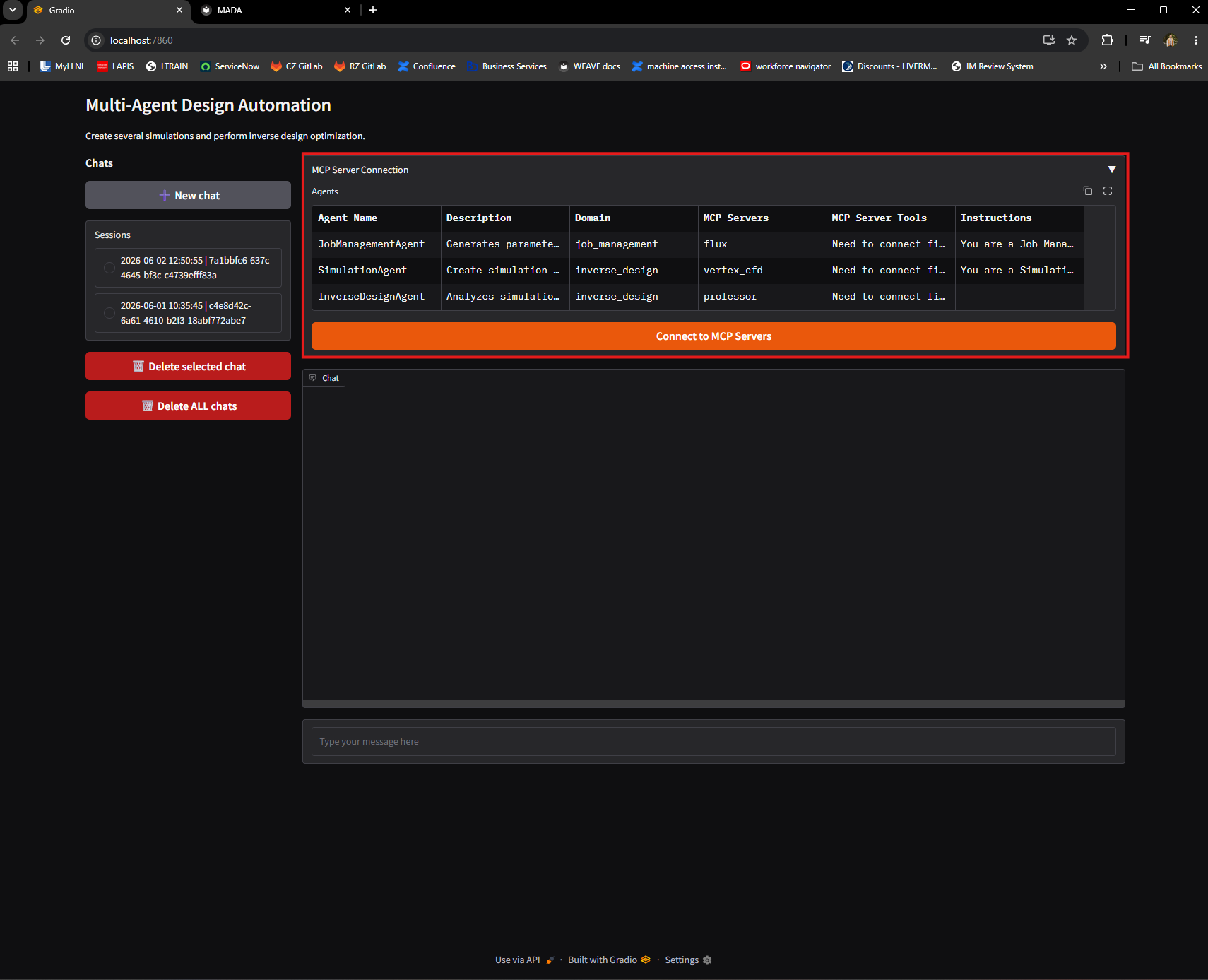
Here we give each agent a name, a brief description, a domain specialization, a list of MCP servers to associate with this agent, and a system prompt. Notice that the MCP servers you list for each agent correspond to a name in the "mcp_servers" entry we created prior to adding our agents.
This is displayed in a table on the Gradio interface.
Finally, we'll tell MADA which model to use:
{
    "interface": {
        "title": "Multi-Agent Design Automation",
        "description": "Create several simulations and perform inverse design optimization."
    },
    "mcp_servers": {
        "flux": {
            "transport": "streamable-http",
            "url": "http://localhost:8001/mcp",
            "description": "Flux workload manager for job execution"
        },
        "professor": {
            "transport": "streamable-http",
            "url": "http://localhost:8005/mcp",
            "description": "Professor surrogate modeling"
        },
        "vertex_cfd": {
            "transport": "streamable-http",
            "url": "http://localhost:8007/mcp",
            "description": "Vertex-CFD simulation"
        }
    },
    "agents": [
        {
            "agent_name": "JobManagementAgent",
            "description": "Generates parameter samples and executes computational workflows",
            "domain": "job_management",
            "mcp_servers": ["flux"],
            "instructions": [
                "You are a Job Management Agent specialized in parameter generation and job execution.",
                "You have access to Flux for executing simulation runs.",
                "You handle the complete workflow from parameter generation through job execution."
            ]
        },
        {
            "agent_name": "SimulationAgent",
            "description": "Create simulation parameter runs and analyze results",
            "domain": "inverse_design",
            "mcp_servers": ["vertex_cfd"],
            "instructions": [
                "You are a Simulation Agent specialized in creating Vertex-CFD parameter runs and analyzing simulation results.",
                "You have access to Vertex-CFD for parameter run creation and result analysis.",
                "Your responsibilities include generating Vertex-CFD parameter runs with the tool 'generate_parameter_runs' and analyzing the results with the tool 'post_process_runs'.",
                "You do NOT execute jobs - that is handled by the JobManagementAgent.",
                "You pass the returned json from 'generate_parameter_runs' to JobManagementAgent so it can start running the simulations."
            ]
        },
        {
            "agent_name": "InverseDesignAgent",
            "description": "Analyzes simulation results and calculates Quality of Interest (QoI)",
            "domain": "inverse_design",
            "mcp_servers": ["professor"],
            "incstructions": [
                "You are an Inverse Design Agent specialized in analyzing simulation results and calculating Quality of Interest (QoI).",
                "You have access to Professor for surrogate modeling.",
                "Your responsibilities include analyzing completed simulation results, calculating QoI metrics, identifying best designs, and building surrogate models for optimization.",
                "You do NOT generate parameters or execute jobs - that is handled by the JobManagementAgent."
            ]
        }
    ],
    "model": {
        "provider": "openai",
        "model": "gpt-5",
        "api_key": "${API_KEY}",
        "base_url": "${API_BASE_URL:-https://api.openai.com/v1/responses}"
    }
}
In this case we're telling MADA to use the gpt-4.1-mini model from OpenAI. We also point the "api_key" setting to the API_KEY environment variable and use a similar setting for "base_url", only this one will have a default value if the API_BASE_URL environment variable is not set.
Congratulations! You've officially configured MADA to run with two agents.
Run MADA
There are two run modes for MADA: "gradio" and "cli". See Using MADA for additional information. In this "Getting Started" example, we'll be running with Gradio.
Warning
MADA does not start your MCP servers for you. This must be done prior to running MADA.
Using the configuration file we created in the last step, we can now start our Gradio interface with MADA using:
This will spin up your Gradio interface on a localhost server, typically http://127.0.0.1:8000/.
Congratulations! You've officially ran a multi-agent interface application with the help of MADA.