Creating Plugin MCP Servers
Note
The preferred registration mechanism for new external packages is now the
extension manifest workflow. The legacy
[project.entry-points."mada_tools.servers"] registration described on
this page is still supported for compatibility.
Legacy plugin MCP servers are useful for several reasons, including:
- Version control, you can pin server behavior to a specific release
- Security, you can restrict execution to audited code paths and controlled dependencies
- Isolation, each server can run with its own environment and permissions
- Reuse, share common tools across projects without copying code
- Maintainability, smaller servers are easier to test, deploy, and update independently
Creating plugin MCP servers for MADA typically involves three steps:
- Install the MADA tools repository
- Create an MCP server
- Register the server in
pyproject.toml
This page will cover each step at a high level.
Installing the MADA Tools Repository
Make sure you have the mada-tools library installed. See Installation for more.
Creating an MCP Server
In your project, create a python file to house your MCP server.
In this file, start by importing the BaseMCPServer class:
Next, create your server class. Below is a template class that you can start from:
from mada_tools import BaseMCPServer


class TemplateHelper:
    def custom_tool(self, text: str) -> tuple[bool, str]:
        if not text:
            return False, "text must not be empty"
        return True, text.upper()


class TemplateServer(BaseMCPServer):
    """
    This is a template MCP server class for MADA.

    To customize this:
    1. Update the args to `super().__init__()` in the constructor
    2. Add your own MCP tools in `_register_tools()`
    """

    def __init__(self):
        """
        Constructor for the TemplateServer.
        """
        super().__init__("Template Server", "A template MCP server.")
        self.helper = TemplateHelper()

    def _register_tools(self):
        """Register MCP tools."""

        @self.mcp.tool()
        def custom_mcp_tool(text: str) -> str:
            """
            Each tool you create in `_register_tools()` should be decorated
            with `@self.mcp.tool()` and given a detailed docstring. Every argument
            should be documented as well.
            """
            return self.run_tool(self.helper.custom_tool, text)
This helper-plus-run_tool() pattern is the recommended design for plugin servers. It keeps the MCP entrypoints thin while placing the real tool logic in reusable Python classes. That is important when you want the same tool behavior to work with both MCP and Programmatic Tool Calling (PTC). For more information on PTC, see the Anthropic Programmatic Tool Calling documentation.
Recommended guidance for plugin servers:
- Keep tool business logic in helper classes or other plain Python callables
- Use
BaseMCPServer.run_tool()inside the MCP-decorated function - Treat the MCP-decorated function as a thin adapter layer rather than the core implementation
- Reuse the helper directly if you later expose the same tool through PTC or another interface
At the bottom of this file, create a main function that initializes and runs this server:
def main():
    """Main entry point for the Template MCP server."""
    server = TemplateServer()
    server.run_with_args("template-server")


if __name__ == "__main__":
    main()
Register the Server in pyproject.toml
Once you have your server file created, all that's left is to register the server in your pyproject.toml file as an entry point for mada_tools. Below is an example using the TemplateServer from the previous section. In this example, we assume the server is located at template/server.py of the example project.
Now when you install your library, your server will be available with MADA.
Validating the Server Registration
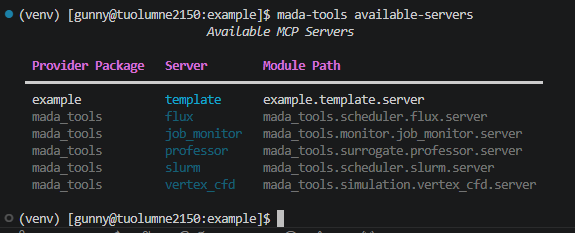
In order to check that your server is available with MADA, use the mada-tools available-servers command. For example, after following the previous set of instructions for the template server, you should see output like so: